Navigating the world of IRS forms can feel like deciphering an ancient scroll, especially when it comes to the ubiquitous 1099 series. Yet, mastering the Key Steps for Filling Out 1099 Forms Accurately isn't just about compliance; it's about protecting your business from penalties and building financial trust.
As a business owner or financial professional, you're the frontline in ensuring the IRS gets its due from non-employee payments. An error here isn't just a minor oversight; it can trigger audits, fines, and headaches you'd rather avoid. This comprehensive guide will walk you through every critical step, transforming what seems like a daunting task into a manageable, even straightforward, process.
At a Glance: Your Quick Guide to 1099 Compliance
- What are 1099s? They're IRS tax documents businesses use to report various types of income paid to non-employees (like independent contractors).
- Why Accurate Filing Matters: Incorrect information or missed deadlines lead to costly penalties.
- Key Forms:
- 1099-NEC: For payments of $600+ to contractors/freelancers.
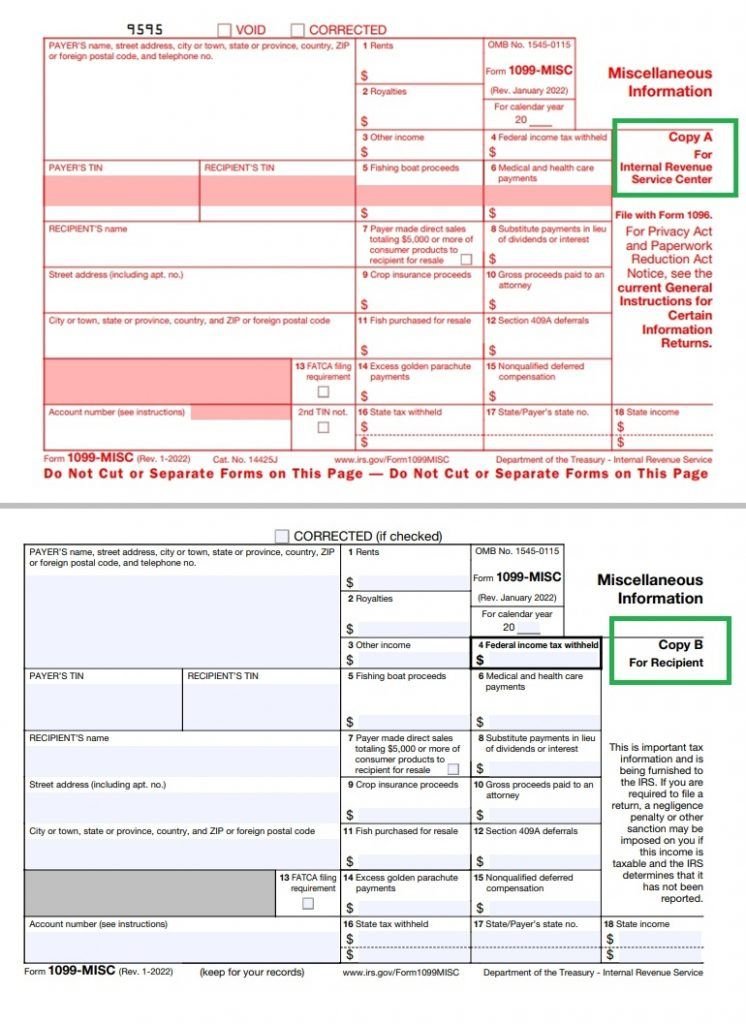
- 1099-MISC: For rents, prizes, medical payments, gross proceeds to attorneys.
- 1099-INT/DIV/R: For interest, dividends, and retirement distributions.
- 1099-K: Filed by payment processors (e.g., PayPal, Stripe), not your business, for certain transactions.
- Start Early: Collect Form W-9s before paying contractors to get accurate Taxpayer Identification Numbers (TINs).
- Validate Data: Use IRS TIN Matching or e-filing tools to confirm TINs and names.
- Report Annual Totals: Don't report individual invoices; sum up all payments for the year per payee.
- Know Your Deadlines: 1099-NEC has an earlier deadline for both recipients and the IRS than most other 1099s.
- E-File if Required: If you file 10 or more information returns in aggregate, e-filing is often mandatory.
- Correct Errors Promptly: Penalties increase the longer an error goes uncorrected.
Why 1099 Forms Matter: Beyond Just Reporting Income
At its core, a 1099 form is how your business communicates to the IRS that you’ve paid a non-employee a certain amount of income. Think of it as a transparent ledger entry, ensuring that income not processed through traditional payroll—like payments to your freelance designer, consultant, or cleaning service—doesn't slip through the cracks. It's an essential cog in the tax system, designed to prevent tax evasion and ensure fairness.
But for you, the payer, 1099s are more than just a reporting obligation. They're a shield. Accurate and timely filing protects your business from the significant penalties the IRS levies for non-compliance. It also provides a clear record for your own tax deductions, substantiating the expenses you claim for contract work. Neglecting these forms can not only invite fines but also raise red flags that could lead to more extensive IRS scrutiny.
Know Your Forms: Deciphering the 1099 Universe
The 1099 isn't a single form; it's a family of documents, each designed for specific types of non-wage income. Understanding which form to use is the first critical step in accurate reporting. Mismatching a payment to the wrong form is a common error that can cause issues for both you and your payee.
1099-NEC: The Contractor's MVP
This is likely the most common 1099 form you'll encounter. Form 1099-NEC (Nonemployee Compensation) is specifically for reporting payments of $600 or more to independent contractors, freelancers, gig workers, and consultants for services rendered. Crucially, this also includes attorney fees paid for services. If you've hired someone for project-based work, from web design to writing, and they aren't on your payroll, this is your go-to form.
1099-MISC: The Catch-All for Other Income
While the 1099-NEC took over reporting nonemployee compensation, Form 1099-MISC (Miscellaneous Income) still plays a vital role. It reports other income types, generally with a $600 threshold, such as:
- Rents (e.g., land, office space, equipment)
- Prizes and awards (not for services)
- Medical and health care payments
- Gross proceeds paid to attorneys (distinct from fees for services, which go on 1099-NEC)
Be careful not to duplicate payments already reported on a 1099-NEC onto a 1099-MISC.
1099-INT, 1099-DIV, 1099-R: Financial Income Specialists
These forms are usually issued by financial institutions and don't typically fall under the direct purview of a business reporting contractor payments, but it's good to know they exist:
- Form 1099-INT (Interest Income): Reports interest paid by banks, brokers, etc., usually for $10 or more.
- Form 1099-DIV (Dividends and Distributions): Reports dividends and certain distributions from corporations or mutual funds.
- Form 1099-R (Distributions from Retirement Plans): Reports payouts from pensions, annuities, IRAs, and other retirement plans.
1099-K: The Payment Processor's Responsibility
This is a critical distinction that often trips up businesses. Form 1099-K (Payment Card and Third-Party Network Transactions) is filed by the payment settlement entity (like PayPal, Stripe, Square, or credit card processors), not your business. This means if you paid a contractor via a credit card or a third-party payment network, the payment processor is responsible for reporting that transaction to the IRS on a 1099-K, provided the payee meets specific transaction thresholds (for tax year 2025, it's $20,000 and 200 transactions).
Crucially, you should not duplicate these payments on a 1099-NEC or 1099-MISC. Double-reporting can create confusion and issues for the recipient.
1099-B, 1099-DA: For Brokers and Digital Assets (Future-proofing)
- Form 1099-B (Proceeds from Broker and Barter Exchange Transactions): Reports proceeds from the sale of stocks, bonds, and other securities, typically issued by brokers.
- Form 1099-DA (Digital Asset Sales/Exchanges): A newer form, effective for transactions on or after January 1, 2025. This form will report sales or exchanges of digital assets (like cryptocurrency) handled by brokers.
Step-by-Step Mastery: How to Fill Out 1099s Accurately
The path to accurate 1099 filing involves several distinct phases, each requiring meticulous attention to detail. Skipping steps or rushing through them is a surefire way to invite errors and, potentially, penalties.
Phase 1: The Data Hunt – Gathering & Validating Information
This initial phase is arguably the most important. Accurate data collection upfront saves immense hassle later.
The W-9 Imperative: Your First Line of Defense
Before you make a single payment to a new independent contractor or service provider, you absolutely must obtain a completed Form W-9, Request for Taxpayer Identification Number and Certification. This form provides you with their:
- Legal name (as registered with the IRS)
- Business name (if different from legal name)
- Address
- Taxpayer Identification Number (TIN), which could be a Social Security Number (SSN), Individual Taxpayer Identification Number (ITIN), or Employer Identification Number (EIN).
- Tax classification (e.g., sole proprietor, LLC, corporation).
Collecting a W-9 ensures you have the correct information to report, minimizing the risk of a TIN mismatch. Getting these forms initially helps streamline the entire 1099 process later on. For a deeper dive into these crucial forms, you might want to look at understanding Form W-9.
TIN Matching: Catching Errors Before They Become Penalties
Once you have a W-9, don't just file it away. The IRS offers a TIN Matching program (or your e-filing platform may have a similar validation tool) that allows you to verify if the name and TIN provided on the W-9 match IRS records. This proactive step can prevent "B-Notices" (CP2100/CP2100A) from the IRS, which indicate a mismatch and require you to take further action.
Smart Record Keeping: Tracking Every Dollar
Maintain meticulous records throughout the year for all payments made to non-employees. This includes:
- Dates and amounts of each payment.
- Payment method (check, bank transfer, etc.).
- Any federal income tax withheld (backup withholding).
- Documentation supporting the services rendered.
Organize these records by payee and by specific box rules for the relevant 1099 form. This makes compiling annual totals much quicker and less prone to error.
Knowing What Not to Report
- Exclude 1099-K Payments: As mentioned, payments processed through credit cards or third-party payment networks (like PayPal, Stripe) are reported by the processor on Form 1099-K. Do not include these payments on your 1099-NEC or 1099-MISC.
- Identify Eligible Vendors: Generally, you only report payments to non-employees for services. Payments for goods, reimbursements (if properly accounted for), or materials (when separate from services) are usually excluded. Also, payments to corporations are generally exempt from 1099-NEC/MISC reporting, unless they are for legal or medical services. Sole proprietors and LLCs (unless they've elected to be taxed as S or C corps) typically do require a 1099 if the payment threshold is met.
Phase 2: Handling Hiccups – Backup Withholding
Sometimes, despite your best efforts, a payee won't provide a correct TIN or will provide one that the IRS deems incorrect. This is where backup withholding comes in.
When and How to Apply Backup Withholding
You are generally required to begin backup withholding at a flat rate of 24% on reportable payments in the following situations:
- No TIN Provided: The payee fails to provide their TIN in the manner required. Start withholding immediately.
- Incorrect TIN: The IRS sends you a CP2100 or CP2100A "B-Notice" informing you that the payee's TIN is incorrect. You must send the payee a "First B-Notice" within 15 business days of receiving the IRS notice. If the payee doesn't return a signed Form W-9 with a correct certification within 30 business days, you must begin backup withholding.
- Underreported Interest/Dividends: The IRS notifies you that the payee has underreported interest or dividend income. (Less common for general businesses.)
Once you've started backup withholding, you stop withholding within 30 calendar days of receiving the required certification from the payee. Understanding what to do about backup withholding can save you from potential liability.
Phase 3: Filling It Out – The Form Itself
Whether you're using software or manually filling out forms, accuracy in each box is paramount.
Generic Payer and Payee Details
At the top of most 1099 forms, you'll enter:
- Your company's legal name, address, and TIN (EIN, SSN, or ITIN).
- The recipient's TIN and legal name (as confirmed by their W-9).
- Generally, for domestic payers, you'll leave the FATCA (Foreign Account Tax Compliance Act) filing requirement box unchecked.
Form-Specific Boxes: Where Every Dollar Goes
Each 1099 form has specific boxes for different types of income. Always refer to the form's instructions or a reliable guide to ensure you're entering amounts in the correct places.
- Report Annual Totals: Remember to report the annual total paid to each payee for the specific income type. Do not submit a separate 1099 for each individual invoice.
- Box 4 - Federal Income Tax Withheld: This box on forms like 1099-NEC, 1099-MISC, and 1099-R is where you report any federal income tax you withheld from payments (typically due to backup withholding).
- Attorney Payments Nuance:
- Fees paid to an attorney for services go into Form 1099-NEC, Box 1.
- Gross proceeds paid to an attorney (e.g., from a settlement where the attorney passes funds through to a client, but the attorney is in control of the funds) go into Form 1099-MISC, Box 10. This distinction is critical.
- Categorical Placement:
- Interest and dividends go on 1099-INT and 1099-DIV, respectively, never on 1099-MISC or 1099-NEC.
- Retirement payouts are reported on Form 1099-R.
Review and Submit
Before submission, perform a thorough review. Match your reported totals against your internal accounting records. Verify all TINs and names one final time. Penalties accrue for both late and incorrect filings, so accuracy here is non-negotiable. Many e-filing platforms offer a review step that catches common errors.
Phase 4: The Finish Line – Filing and Delivery
Once your forms are complete, the final hurdle is getting them to the IRS and your payees by the correct deadlines. For tax year 2025 (forms filed in 2026), there are distinct deadlines depending on the form.
Key Deadlines for Tax Year 2025 (2026 Deadlines)
- Form 1099-NEC:
- February 2, 2026: Furnish Copy B (recipient copy) to the payee AND file with the IRS (this single date applies to both paper and e-file).
- Most Other 1099s (e.g., 1099-MISC, 1099-INT, 1099-DIV, 1099-R):
- February 2, 2026: Furnish recipient copies.
- March 2, 2026: File with the IRS (paper filing).
- March 31, 2026: File with the IRS (e-file).
- Special Later Furnish Date: For Form 1099-MISC with amounts in Box 8 (Substitute Payments in Lieu of Dividends or Interest) or Box 10 (Gross Proceeds Paid to an Attorney), or for Forms 1099-B, 1099-DA, or 1099-S, the recipient copy due date is February 17, 2026.
Note: If any deadline falls on a weekend or federal holiday, it automatically shifts to the next business day.
The E-File Mandate: Are You Required to Go Digital?
The IRS generally mandates e-filing if you have 10 or more information returns in aggregate (this includes all types of 1099s, W-2s, etc.). This threshold was lowered from 250, making e-filing a requirement for many small and medium-sized businesses. Unless you qualify for a waiver, plan to e-file. Understanding the IRS e-file mandate is crucial for compliance.
Need More Time? Understanding Extensions
- To file with the IRS: You can request an extension using Form 8809, Application for Extension of Time to File Information Returns. Most 1099 forms (excluding 1099-NEC) receive an automatic 30-day extension. For 1099-NEC, an extension is not automatic and requires a non-automatic request that meets specific IRS criteria (e.g., catastrophic event, fire, casualty).
- To extend recipient copy due dates: You generally need to fax Form 15397 by the original due date. This can grant you an additional 30 days to furnish copies to recipients.
State-Specific Filing: Don't Forget Your State!
Many states require copies of 1099 forms to be filed directly with them, often with deadlines that differ from the IRS. While some states participate in the Combined Federal/State Filing (CF/SF) program, which automatically forwards certain e-filed forms to participating states, not all states participate, and some require separate direct filings. For tax year 2025, Form 1099-DA is not part of the CF/SF program. Always check your specific state's requirements to avoid state-level penalties.
The High Cost of Mistakes: 1099 Penalties
The IRS takes 1099 compliance seriously, and penalties can add up quickly. These fines apply per form for both late filing with the IRS and late/incorrect furnishing to the recipient.
Tiered Penalties: The Sooner, The Cheaper
For tax year 2026 (for 2025 forms), the penalty tiers are:
- $60 per form: If corrected or filed up to 30 days past the deadline.
- $130 per form: If corrected or filed 31 days past the due date, but before August 1.
- $340 per form: If corrected or filed after August 1, or if never filed at all.
Imagine a business with 20 incorrect forms. If caught after August 1, that's $340 x 20 = $6,800 in penalties – a significant and avoidable expense.
Intentional Disregard: A Steep Price
If the IRS determines that you intentionally disregarded the filing requirements, the penalty shoots up to a minimum of $680 per form, with no maximum limit. This emphasizes the importance of good faith effort and prompt correction.
Oops! Fixing 1099 Errors & Avoiding Further Penalties
Mistakes happen, but it's how you handle them that truly matters. Prompt correction can significantly mitigate penalties.
Error Type 1: Wrong Amounts, Codes, or Checkboxes (or Filed When Shouldn't Have)
This is a common error, such as entering $6,000 instead of $600, or checking the wrong box.
How to Correct:
- File one corrected return. Prepare a new 1099 form for the payee.
- Check the "CORRECTED" box at the top of the new form.
- Fill in all the correct information and amounts.
- Submit this corrected form to the IRS and furnish a copy to the payee, clearly marked "CORRECTED."
Error Type 2: Wrong/Missing Payee TIN or Name, or Wrong Form Type
This is a more severe error, indicating a fundamental flaw in identifying the recipient or the type of income.
How to Correct:
- Cancel the bad record: File a return with the same payer and payee information as the original incorrect form. Check the "CORRECTED" box. Enter $0 (zero) in all amount boxes. This effectively "voids" the original incorrect form.
- File a new original return: Prepare a separate new 1099 form with the correct payee name/TIN and the correct amounts. Do NOT check the "CORRECTED" box on this second form, as it's intended to be the valid, original filing. If the original form type was wrong, prepare the new original on the correct 1099 form (e.g., if you mistakenly used 1099-MISC instead of 1099-NEC).
- Submit both forms to the IRS. Furnish the corrected $0 form and the new original form to the payee.
Best Practices for Correcting Mistakes
- E-file Corrections: If you originally e-filed your 1099s, you should always submit corrections electronically as well.
- Recipient Copies: When sending corrected statements to recipients, ensure the "CORRECTED" label is clear. For Type 2 errors, ensure they receive both the canceled form and the new, correct form.
- Don't Delay: The penalty tiers illustrate that time is money. Correct errors as soon as you discover them.
For businesses looking for comprehensive guidance on how to manage their tax documentation effectively, including the nitty-gritty of filling out these forms, exploring resources on how to generate a 1099 can provide additional context and tools.
Beyond the Basics: Actionable Insights for Flawless 1099s
Accuracy in 1099 filing isn't just about avoiding penalties; it's a mark of a well-run business. By adopting a few key best practices, you can streamline the process and minimize stress.
Proactive W-9 Collection: A Golden Rule
This can't be stressed enough: Always obtain a completed Form W-9 from every new vendor or contractor before you make your first payment. Make it part of your vendor onboarding process. This ensures you have accurate Taxpayer Identification Numbers (TINs) and legal names from day one, drastically reducing the chances of TIN mismatch notices down the line.
Accurate Classification: Services vs. Goods
Be diligent in classifying what you're paying for. 1099-NEC is for services. If you're paying a vendor primarily for goods, materials, or reimbursements (that are separately accounted for and not taxable income), those payments generally do not require a 1099-NEC. If a contractor provides both services and materials, only the service portion is typically reportable on a 1099-NEC (unless the materials are incidental and integral to the service).
Review, Review, Review: Internal and Client Verification
Before hitting submit, implement a multi-stage review process:
- Internal Review: Have someone other than the person who prepared the forms (if possible) review all drafted 1099s. Check payment amounts against your general ledger, verify vendor classifications, and confirm W-9 details.
- Client/Payee Verification: Consider sending draft 1099s to your payees a few weeks before the official due date. This gives them a chance to review the amounts and alert you to any discrepancies, allowing you to correct errors before official filing.
Robust Record Keeping: Your Audit Shield
Maintain a secure, organized system for all 1099-related documents. This includes:
- Copies of all filed 1099 forms (both IRS and recipient copies).
- IRS submission confirmations (especially for e-filed forms).
- All W-9 forms.
- Any correspondence related to TIN matching or backup withholding.
These records are your best defense in the event of an IRS inquiry or audit.
Avoid These Common 1099 Pitfalls
- Failing to collect W-9s upfront: This is the most frequent source of headaches.
- Using incorrect TINs or business names: Leads to B-Notices and potential penalties.
- Missing filing deadlines: Results in tiered penalties that increase with delay.
- Reporting payments made via credit card or third-party networks on 1099-NEC/MISC: These are handled by Form 1099-K, leading to double-reporting if you include them.
- Confusing 1099-NEC with 1099-MISC: Especially for attorney payments, distinguish between fees for services and gross proceeds.
Your Next Step to 1099 Confidence
Filling out 1099 forms accurately doesn't have to be a source of year-end dread. By understanding the different forms, adopting a proactive approach to data collection, and adhering to strict deadlines and review processes, you can navigate these requirements with confidence. Remember, the IRS prioritizes compliance, and so should you. Take these steps to heart, and you’ll not only avoid penalties but also build a more robust, compliant financial framework for your business.